Speech Analytics

Turn Voice Data into Actionable Intelligence to Optimize Call Center Performance

Analytics 365 empowers users to extract valuable insights from every customer call. Using artificial intelligence (AI)-powered speech analytics, the platform analyzes sentiment, keywords, and conversation patterns, helping you understand customer emotions, spot issues early, and improve agent interactions.
Evaluation Scorecards

Our Solutions Are Trusted By Businesses Worldwide

Nissan Logo
SSAFA logo
Make-A-Wish logo
St Catherines Hospice logo
Osotspa logo

How Analytics 365 Works

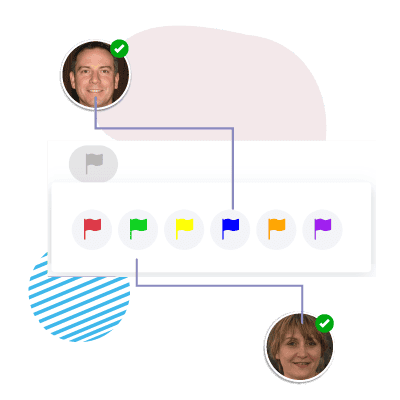
Integrated fully with Microsoft Teams, Analytics 365 captures and processes conversations, applying advanced AI to transcribe and analyze speech in real time. It detects and flags calls that include specified keywords and phrases. Flags are applied in real-time and remain attached to each stored recording, so users can filter both recent and historical recordings by topic in the portal. When a notification overlay is applied, it will also trigger an email notification to specified persons. Managers have access to dashboards and detailed reports.


Looking For The Call Recording Control Extension?

Download the Call Recording Controller App to pause, resume, and discard recordings made with Analytics 365 Call Recording and Conversation Analytics

Call Center Speech Analytics Software

Extract Meaningful Insights and Improve Customer Interactions.
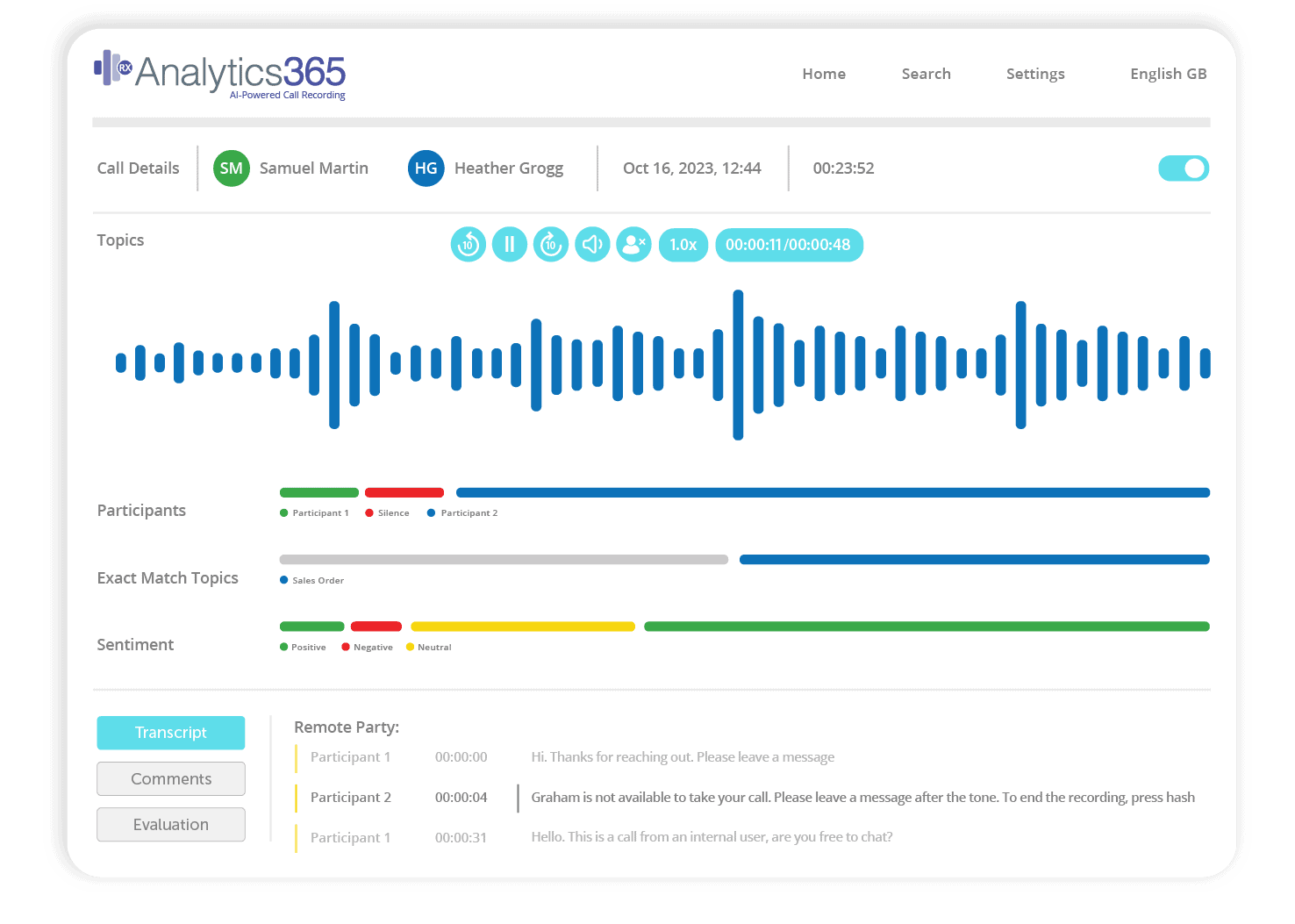
Visual Timeline Showcasing Call Sentiment

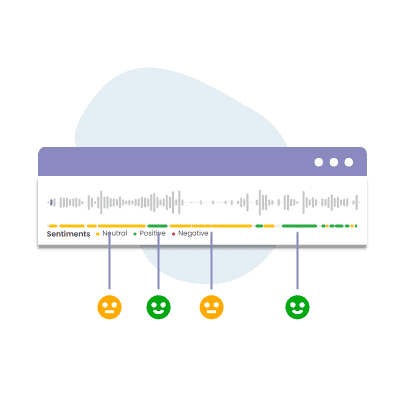
Analytics 365 tracks customer emotions throughout a single call by analysing vocal tone, pitch and pace. As this information is presented as a visual timeline, supervisors can quickly analyse shifts in sentiment without listening to the whole recording. For example, a visual timeline showing a call starting with a negative sentiment, and ending with a positive sentiment, confirms that the agent successfully turned the conversation around.

Keyword and Topic Spotting

Our platform automatically flags important keywords and recurring topics within calls. The visual timeline pinpoints exactly when a flagged topic occurs, such as a customer complaint or a risk trigger. This allows a compliance manager to skip through a 30-minute call to get straight to the critical segment, saving time and enabling early action.

search functionality
report permissions

Trend and Root Cause Analysis

By aggregating data across all calls, Analytics 365 identifies common themes and systemic issues that drive customer contact. These insights empower businesses to address root causes, optimize processes, and reduce repeat calls, improving overall operational efficiency.

Analytics 365 scans calls to highlight potential compliance breaches, such as missed disclosures or inappropriate language. Meaning supervisors can quickly investigate and resolve risks, keeping the organization audit-ready and protecting its reputation.
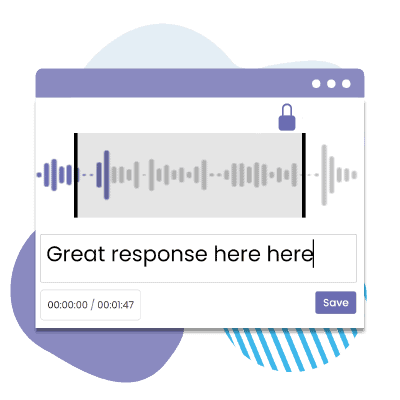
Download and Build Playlists for Training

Agent Performance Insights

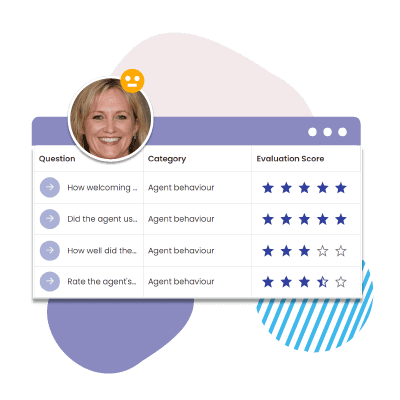
The platform provides managers with detailed insights so they can identify coaching opportunities using objective data, focusing training efforts to enhance agent skills and boost customer experience.

Find Out How Analytics 365 Can Transform Your Business

If you are interested in one of the Analytics 365 solutions and would like to find out more, request a demo today to explore how our platform delivers insights that empower your business to improve team performance, ensure compliance, and enhance customer engagement.

Setting Up Analytics 365 Is As Easy As 1, 2, 3

Step 1

Choose your plan.

Step 2

Grant permission to sync your data.

Step 3

Explore your insights.

Explore Real Feedback, and Discover What Analytics 365 Can Do For You

customer picture

“Analytics 365 has been invaluable. It has helped us to enhance our collaboration and communication which in turn positively impacts our performance and productivity”.

Pajaree Saengcum
Head of Digitalization

Osotspa logo

Call Recording with Conversation Analytics Plans and Pricing

Empower teams with workplace analytics driven by Microsoft Teams. Collect and analyse user data to boost productivity and increase collaboration within your business.

Essentials recording and analytics

From $7.00 / user

Ultimate recording and enhanced AI powered analytics

From $26.95 / user

Frequently Asked Questions

The speech analytics features in Analytics 365 Call Recording with Conversation Analytics are designed for any organization that handles customer conversations over Microsoft Teams and wants to understand what’s being said across every call. They’re typically used by sales and customer service managers, team leaders, quality assurance leads and compliance teams, and are especially valuable in regulated sectors such as financial services and healthcare, though any customer-facing team using Microsoft Teams can benefit.

Speech analytics is part of Analytics 365 Call Recording with Conversation Analytics, which integrates securely with Microsoft Teams. Once a call ends, it’s transcribed using AI and analyzed for sentiment, keywords and conversation patterns, so you can understand customer sentiment, spot issues early and improve how your team handles calls. Flagged calls and dashboards are available in the Analytics 365 Call Recording with Conversation Analytics web portal.

Speech analytics includes five core capabilities: sentiment analysis (scoring each conversation based on the words used in the call transcript), keyword and topic spotting (flagging complaints, risk triggers or key topics), trend analysis (surfacing recurring themes across all calls), risk and compliance monitoring (highlighting missed disclosures or inappropriate language), and agent performance insights (using objective data to guide coaching).

Businesses typically see faster identification of compliance risks, fewer repeat customer contacts thanks to root-cause insights, and more targeted agent coaching, all of which contribute to improved customer satisfaction and reduced operational risk.

Analytics 365 Call Recording with Conversation Analytics integrates with Microsoft Teams via the Graph API, so your calls are captured automatically. Once a call is complete, it’s transcribed and analysed using AI, and the results appear in a separate, secure web portal rather than inside the Teams app. Calls containing specified keywords or phrases are flagged in the portal and can trigger email notifications to nominated managers.

Analytics 365 Call Recording with Conversation Analytics connects securely to your Microsoft Teams environment, so your calls are captured automatically. Once a call is complete, it’s transcribed and analyzed using AI, and the results appear in a separate, secure web portal rather than inside the Teams app. Calls containing specified keywords or phrases are flagged in the portal and can trigger email notifications to nominated managers.

Yes. Speech Analytics is built on Analytics 365’s Microsoft-certified compliance recording infrastructure, with call data encrypted and securely stored so you can meet GDPR and other regulatory obligations while automatically flagging potential compliance risks within conversations.

The speech analytics capabilities within Analytics 365 are built to support GDPR compliance. Analytics 365 uses Microsoft-certified compliance recording infrastructure, with call data encrypted and stored securely, giving you control over who can access recordings and how long they’re kept.

Manually listening back through calls to catch compliance risks, quality issues or unhappy customers doesn’t scale. Speech analytics solves this by automatically analyzing every conversation once the call has ended, flagging risk triggers and negative sentiment so managers can go straight to the calls that need attention rather than searching for them.

Native Microsoft Teams reporting shows call volumes and durations, but it can’t tell you what was actually said. Speech analytics goes further by analyzing the transcript of every conversation, giving supervisors a visual sentiment timeline, keyword flags and recurring themes rather than just raw call metrics.

Speech analytics is about more than fixing what’s broken. By analyzing every conversation, teams use it to find ways to improve their people, products and processes, from spotting recurring product feedback and new sales opportunities to identifying where processes are causing friction for customers. It’s also used to monitor calls for compliance breaches, understand the root causes of repeat contact and pinpoint coaching opportunities for individual team members.

Most teams start the day by reviewing calls flagged since their last check, such as calls with negative sentiment or specific keywords, missed disclosures or complaints. From there, the visual timeline lets them jump straight to the relevant moment in a call rather than replaying it in full, then share findings with team leaders or feed them into coaching.

Minutes, not weeks. Analytics 365 Call Recording with Conversation Analytics takes around four minutes to set up: choose your plan, grant permission to sync your Microsoft Teams data, and start exploring insights as soon as your first calls have been recorded and analyzed.

All calls recorded and analyzed in Analytics 365 Call Recording with Conversation Analytics are encrypted and stored securely, with access governed by role-based permissions so users only see the recordings and transcripts relevant to them. Recordings can be shared externally via secure, time-limited links when needed for audits.

Unlike standalone speech analytics tools that sit on top of your phone system, speech analytics in Analytics 365 Call Recording with Conversation Analytics works alongside the product’s other features, including compliance recording, evaluation and transcription. That means recordings, transcripts, sentiment and keyword insights all sit in one place rather than being spread across multiple platforms.

You wouldn’t base a performance review on just 2% of the information, so why make decisions about your people, products and processes from a small sample of calls? Speech analytics gives you complete visibility of every customer call, helping managers focus coaching on the moments that matter rather than relying on subjective spot-checks. The result is more consistent performance and a better customer experience.

Once each call has ended, sentiment analysis can review the transcript to flag negative sentiment and risk triggers, giving compliance teams in regulated industries such as financial services and healthcare a reliable way to identify potential breaches across every conversation. Combined with keyword and topic spotting, this lets supervisors go straight to flagged calls, investigate quickly and keep the organization audit-ready.

Speech analytics removes the guesswork from quality assessment by analyzing the sentiment and keywords in every call rather than a small manual sample. The visual sentiment timeline lets supervisors see exactly where a conversation improved or declined, giving objective, consistent feedback rather than subjective spot-checks.

For healthcare call centers, speech analytics transcribes and analyzes every patient call once it ends, flagging sentiment shifts and compliance-relevant keywords. This gives supervisors an objective way to score call quality and identify coaching opportunities without needing to listen to entire recordings. Learn more on our Healthcare solutions page.

Analytics 365 Call Recording with Conversation Analytics uses speech analytics to aggregate data across all your outbound calls, surfacing recurring themes, objections and successful conversation patterns. By identifying what separates high-performing calls from unsuccessful ones, teams can refine scripts and coaching to improve outbound outcomes over time.

Speech analytics is part of Analytics 365 Call Recording with Conversation Analytics, which connects securely to your Microsoft Teams data, so there’s nothing to install inside the Teams app. Calls are analyzed after they end, with insights, flags and dashboards available in the Analytics 365 Call Recording with Conversation Analytics web portal. This is a separate portal from Analytics 365 Call Analytics, which handles call reporting.

Our Latest Blog Posts

  • Improving Call Response Time to Meet SLAs

    In this post, we’ll uncover some of the best tips to incorporate scheduling, automation, prioritization, and other strategies to cultivate [...]

  • Why Phone Calls Are the Ultimate CX Data Source

    Every day, your contact centre handles hundreds, if not thousands, of phone calls. Each one is a live, unscripted [...]

  • How AI-Driven Conversation Analytics Support After-Call Work in Call Centers

    Introduction After-call work (ACW) has a direct impact on customer experience, agent productivity, and overall contact center performance. Once [...]

Supercharge Microsoft Teams In Your Business With Analytics 365

Unlock the full potential of your communications with our Microsoft Teams Toolkit. Request a demo today to explore how our platform delivers insights that empower your business to improve team performance, ensure compliance, and enhance customer engagement.

ISO 27001 Certified
Zoho's customer service champion award 2025
ISO 9001 certified
Tollring winning best software vendor in the comms national awards 2026
Microsoft Azure certified software
Microsoft logo